
Keeping your heat and serve records up to date is essential for managing fertility performance and maintaining accurate breeding records. With HerdPlus, you can quickly record heats and AI serves online or through the HerdPlus App, whether you’re in the office or out on the farm.
Record Heat & AI / Serve Events Using the HerdPlus App
Step 1: Download the HerdPlus App
The HerdPlus App is available on both Android and Apple devices.
Search for “ICBF HerdPlus” in your app store and download the app.
Step 2: Log In
Open the app and log in using your usual HerdPlus username and password.
Step 3: Open the Heat & Serves Screen
Tap the menu icon and select:
Record Events → Heat & Serves
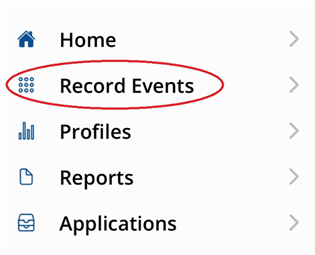
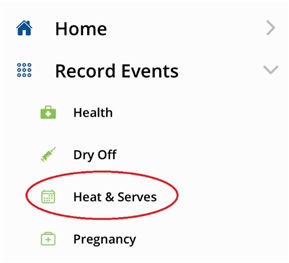
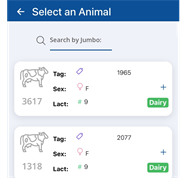
Step 4: Select an Animal
Choose the animal from the list or use the search bar to find an animal using its Jumbo number.
Step 5: Enter the Serve Details
Enter the date of service and select or enter the bull used.
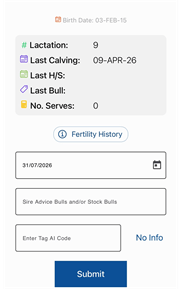
Step 6: Submit the Record
Tap Submit to save the service record.
Your heat and serve information will then be recorded directly to your HerdPlus account.
Record Heat & AI / Serve Events Online
If you prefer, heat and serve events can also be recorded online through your HerdPlus account.
Step 1: Log in to your HerdPlus Account
Visit www.icbf.com and log in using your HerdPlus username and password.
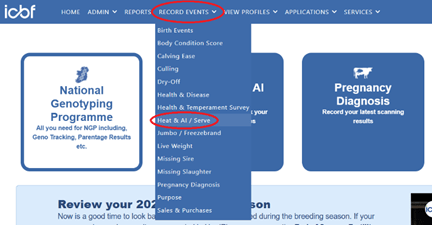
Step 2: Open the Heat & AI / Serve Screen
From the top menu, select:
Record Events → Heat & AI / Serve
Step 3: Enter Heat and Serve Details
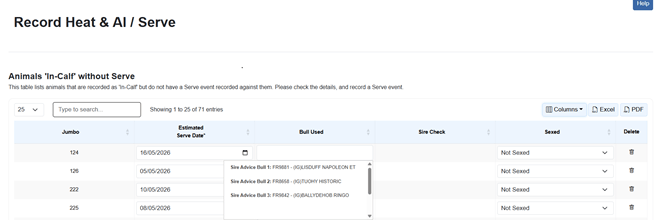
Select the animal you wish to record and enter:
- Service date
- Bull used
- Sexed semen status (if applicable)
If your herd has Sire Advice or stock bulls recorded, these may be available for quick selection from the drop-down list.
Step 4: Save the Record
Once all details have been entered, save the record to update your herd’s fertility information.
Benefits of Recording Heat & Serve Events
Recording heats and serves regularly can help you:
- Maintain accurate breeding records
- Monitor fertility performance
- Track repeat services
- Improve herd reproductive management
- Keep fertility reports up to date
For more information, contact the HerdPlus team on 023 8820452 or email [email protected].