
HerdPlus members can generate CBV catalogues to clearly demonstrate the genetic value of calves offered for sale.
If you are selling calves directly off-farm this spring, the Commercial Beef Value (CBV) Catalogue is an excellent tool to help market your calves and highlight their genetic potential to buyers. The CBV catalogue function is available for eligible animals and can be generated by all HerdPlus members. It presents buyers with a clear, credible view of the beef genetics behind each calf—helping your animals stand out in a busy marketplace.
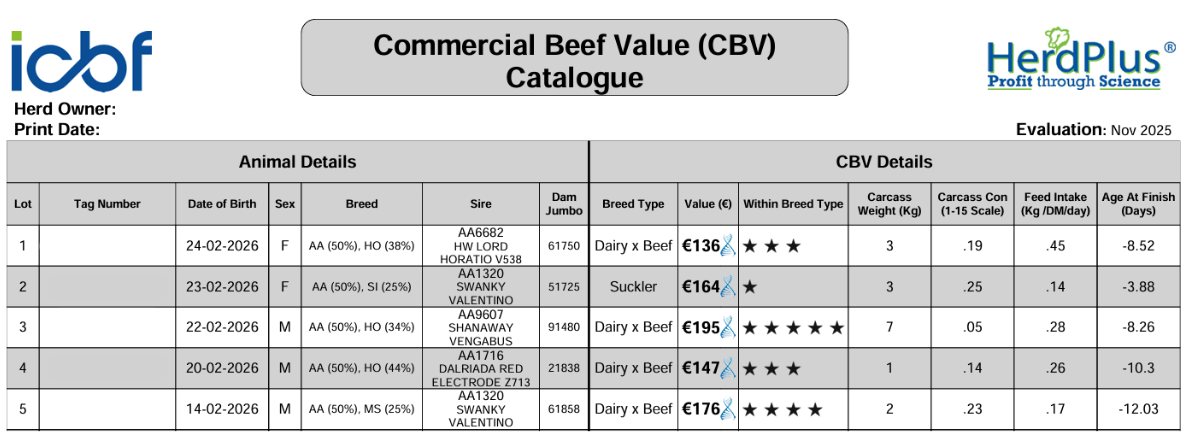
Each catalogue includes key animal details such as tag number, sex and sire, along with a dedicated CBV section. This section outlines breed type, overall CBV value, and within‑breed‑type star rating. It also displays important traits for non‑breeding (drystock) farmers such as carcass weight, carcass conformation, feed intake, and age at finish (see Figure 1). By presenting this information upfront, sellers can give potential buyers confidence in the quality and future performance of the calves on offer.
Why do some animals not display CBV information?
Some calves will not display CBV information in the catalogue. Common reasons include:
- Missing sire information: No recorded sire means no CBV (e.g., animal 829 in Figure 1).
- Sire not verified: If the sire was not in the same herd as the dam or there was no matching AI serve recorded 270–305 days before birth, CBV cannot be shown (e.g., animal 823 in Figure 1).
- Pedigree animals: Pedigree calves do not display CBV.
- Females that have calved: These animals are excluded from CBV calculations.
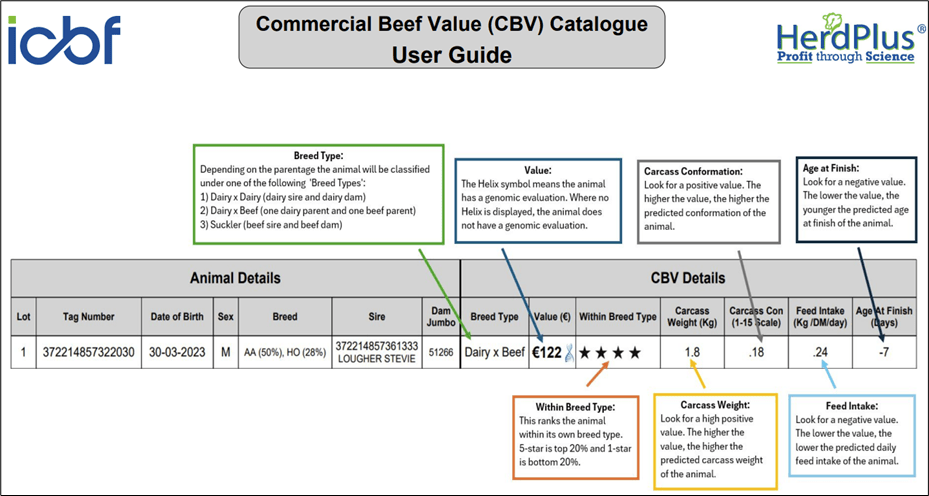
To support farmers, a new user guide has been added as the front page of every catalogue. This guide explains how to read and interpret the CBV information (see Figure 2).
How do I generate a CBV catalogue?
Farmers can create a CBV catalogue quickly and easily through their HerdPlus accounts:
- Log in to HerdPlus.
- Select “Applications” from the top menu and choose “Sales Catalogue.”
- A full list of animals in your herd will appear. Select the calves you want to include and click “Continue” (top right).
- The next screen will show your selected animals on the right.
- Choose the CBV option in the lower-left corner.
- Click “Generate Catalogue.”
A PDF CBV catalogue will be created instantly—ready to print, share digitally, or send directly to potential buyers.