
The Sales Catalogue service on HerdPlus allows farmers to create professional beef and dairy sale catalogues directly from their herd records. The catalogue includes important pedigree, genetic and performance information and can be downloaded for printing or sharing with prospective buyers. This guide explains how to create, customise and download a Sales Catalogue on HerdPlus.
Accessing the Sales Catalogue
To begin:
- Log in to your ICBF HerdPlus account.
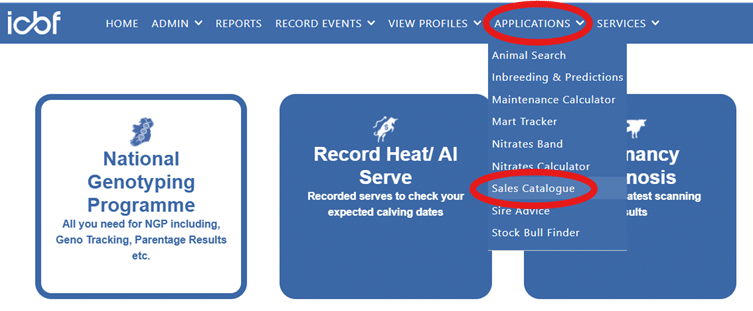
- Select Applications from the menu.
- Select Sales Catalogue.
The Sales Catalogue screen will open and display the animals currently available within your herd.
Select Animals for Your Sales Catalogue
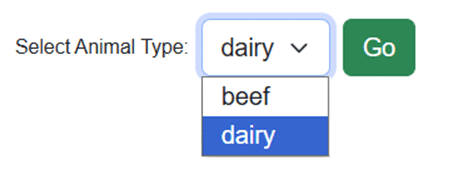
Select Beef or Dairy from the Select Animal Type dropdown menu and click Go.
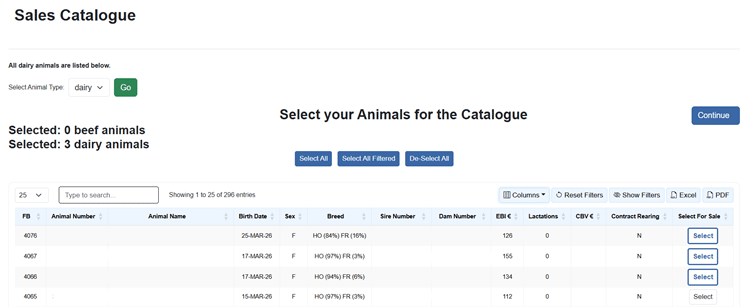
Select the animals you wish to include in the catalogue. If required, use the available filters to narrow the list and find specific animals.
You can also use the following options:
- Select All
- Select All Filtered
- De-select animals
Once you are happy with your selection, click Continue.
Review and Arrange the Animals
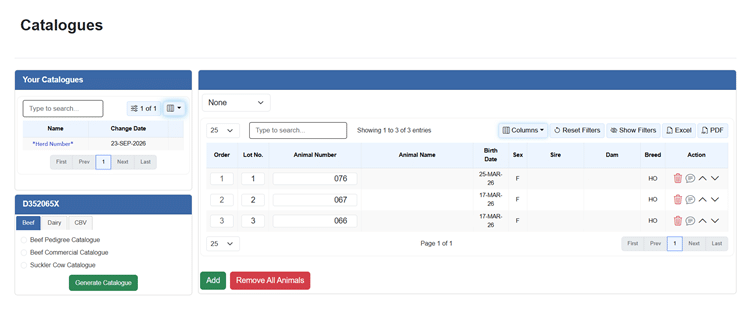
After clicking Continue, you will be brought to the Catalogues screen.
On the left-hand side, your herd number is displayed above the available catalogue types. The animals included in the catalogue are shown in the main section of the screen.
For each animal, you can:
- Change the Order in which the animal appears in the catalogue
- Enter or update the Lot No.
- Use the arrow icons to move the animal up or down
- Remove the animal using the bin icon
If you need to include more animals, click Add at the bottom of the screen. If you wish to clear the catalogue and start again, click Remove All Animals.
Select a Beef, Dairy or CBV Catalogue
Once you are happy with the animals included, select the required catalogue type from the left-hand side of the screen.
Beef Catalogues
Available beef catalogue options include Beef Pedigree, Beef Commercial and Suckler Cow catalogues.
Dairy Catalogues
Available dairy catalogue options include Dairy Pedigree Catalogue and Dairy Commercial Catalogue.
CBV Catalogue
For animals with Commercial Beef Value information, select the CBV tab and choose CBV Catalogue.
Once you have selected the required catalogue type, click Generate Catalogue. The available download options will then be displayed.
Download Your Catalogue
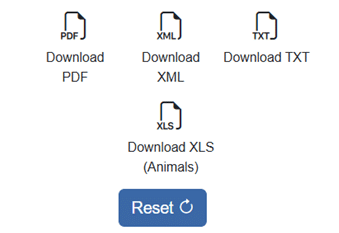
Once you click Generate Catalogue, the catalogue will be created and a number of download options will become available.
Depending on your requirements, you can download:
- PDF version of the catalogue for printing or sharing with prospective buyers
- XML file
- TXT file
- XLS (Animals) file containing animal information in spreadsheet format
You can also select Reset to clear the catalogue and start again if required.
Review Your Catalogue Before Sharing
Before sharing your catalogue with prospective buyers, download the catalogue and take a few moments to review it
Check that:
- The correct animals are included
- The animals appear in the correct order
- Lot numbers are accurate
- Animal details are correct
Once you are satisfied that all information is correct, the catalogue can be printed or shared with prospective buyers.
A Professional Way to Present Your Animals
The HerdPlus Sales Catalogue brings important genetic, pedigree and performance information together in one clear document, making it a convenient and professional way to present animals for upcoming or private sales.